
CapabilitiesManage, engage, create, grow and prove
 Learning Management System (LMS)Manage and automate all your training
 Learning Experience Platform (LXP)TikTok-style learning, in-built content
 AI StudioTurn any document into training
 Skills-based trainingMap skills, track competency and close gaps
 Reporting & InsightsAudit-ready proof of completion and skill
- AI-powered learning experienceDaily Picks, Hugo and AI across 5Mins
- TikTok-style feedMicrolessons people finish
- AI Course CreatorA full course from one document
- RoleplaysPractice real conversations with AI
- Native mobile appiOS and Android, with frontline login
- AutomationsEnroll and remind people automatically
Platform overview
One platform. Five capabilities. One AI intelligence layer.
 Compliance TrainingNever miss a regulation
 Leadership & Soft SkillsTurn high performers into multipliers
 Onboarding & Role-based TrainingAccelerate team ramp-up
 AI & Gen AI TrainingFuture-proof your workforce with AI skills
 Health & Safety TrainingTurn near misses into safer habits
 Sales & CS EnablementTraining that drives revenue
Solutions overview
Training for every team, finished in 5 minutes a day.


Turn any document into a full training course instantly
AI Course Creator turns your policies, decks, and videos into narrated, multi-lesson courses in 20+ languages.
 4.6
4.6
 4.7
4.7
From document to course in three steps
Skip the storyboard and the authoring tool. Start from the material your team already has.
- 01

Upload
Add up to 3 documents (PDF, PPTX, or DOCX) or one video up to 100 MB.
- 02

Generate
AI builds a multi-lesson course with narration, images, and quizzes.
- 03

Review and assign
Edit anything, preview it as a learner, then assign it in 5Mins or export it as SCORM.
Turn a long document into a course people finish
- Upload a policy, deck, or video and get a full multi-lesson course
- Edit the script, scenes, and images before anything goes live
- AI drafts a multiple-choice quiz for every microlesson, ready for your review
"We use AI Studio to turn new menus, drinks lists, and partnerships into bite-sized lessons with a short quiz, so colleagues know the details before their shift."
/joseph-carroll-permanently-unique-group.webp?width=44&height=44&name=joseph-carroll-permanently-unique-group.webp) Joseph CarrollGroup HR Manager, Permanently Unique Group
Joseph CarrollGroup HR Manager, Permanently Unique Group/permanently-unique-group-logo.webp?height=40&name=permanently-unique-group-logo.webp)
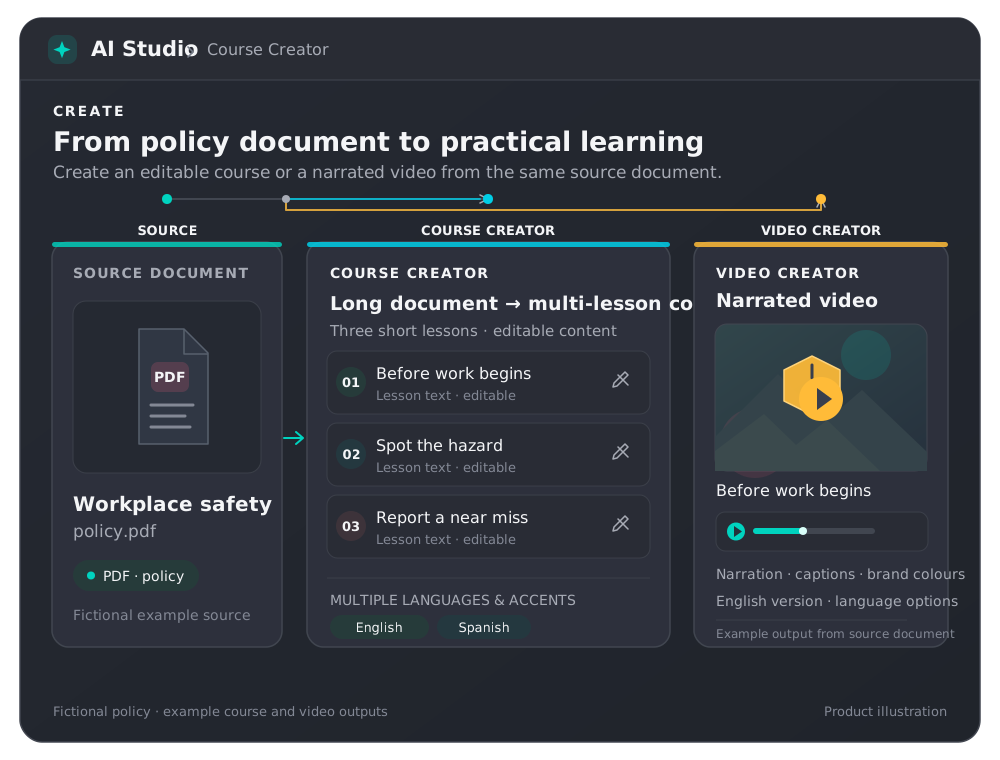


Upload a policy and AI Course Creator turns it into editable microlessons, plus a narrated video.
Sound like your company, in every language
- Choose from 15 AI voices with American, British, and Australian accents
- Add your logo and brand colors to every microlesson
- Publish in 20+ languages at the same time, built in the background while you work
 Workplace safetyAI Course Creator · 6 lessons
Voice 15 AI voices
Brand
Languages 20+ available
Example settings
One document, many ways to learn
AI Course Creator builds more than microlessons. Pick the format that fits the topic, from flashcards to near-miss safety videos.

Flashcards
Turn PDFs, decks, video, or audio into flashcards, with AI-generated images.
AI Course Creator
Quiz generation
Draft a multiple-choice quiz for any microlesson, then review it before it goes live.
AI Course Creator
AI Course Creator
A full multi-lesson course from one document, in 20+ languages.
- Microlessons
- Narration
- Quizzes
- SCORM

Interactive SCORM lessons
Click-through microlessons with quizzes, matching, and card-sort, plus a phishing simulation.
AI Course Creator
Near-miss videos
Turn a safety incident or near miss into a short video and a printable safety brief.
AI Course Creator
Motion Studio and Characters
Animated explainers in your brand colors, hosted by your own mascot or presenter.
AI Course CreatorDays of course building, now a couple of hours

of monthly L&D admin time saved
- 3-4 days a month of content creation, now a couple of hours
- 58% less compliance training time
We used to spend three to four days a month finding and building training content. Now a new program takes a couple of hours, because 80% of the time what we need is already in the 5Mins library.
/laura-wallace-candyspace.webp?width=46&height=46&name=laura-wallace-candyspace.webp)
AI does the building. You sign it off.
Every course starts as a draft you can edit, and your documents are never used to train AI models.
 Review before it goes liveEdit microlessons, approve quizzes
AI Course Creator drafts, you decide. Edit the script, scenes, and images, approve AI-generated quizzes, and preview the course as learners will see it before you publish.
 Your content stays yoursNever used to train AI models
Your documents are never used to train AI models. 5Mins is ISO 27001 certified and GDPR compliant, and data is encrypted in transit and at rest.
 Works with your current LMSSCORM export and Docebo
Export microlessons as SCORM to run them in the LMS you already use, or connect through the Docebo integration.
 Assign it with zero adminEnroll and remind automatically
Run the course in the 5Mins LMS. Add it to a program, auto-enroll new joiners from your HR system, and send reminders by email, Slack, and Teams.
 AI Studio
 Roleplays
 TikTok-style feed
 Automations
Questions about AI Course Creator
What is an AI course creator?
An AI course creator turns material you already have into training. In 5Mins, AI Course Creator sits inside AI Studio and turns a policy, deck, or video into a full multi-lesson course with narration, images, and quizzes, ready for you to review and assign.
How do I turn a PDF into a training course?
Upload the PDF to AI Course Creator in AI Studio. AI builds a multi-lesson course with narration and quizzes. Edit the microlessons, preview the course as a learner, then assign it in 5Mins or export it as SCORM.
What can I upload to AI Course Creator?
Up to 3 documents (PDF, PPTX, or DOCX) or one MP4 or MOV video up to 100 MB. Flashcards can also start from audio.
Can I edit the course before it goes live?
Yes. You review everything before it goes live. Edit microlesson scripts, scenes, and images, and approve AI-generated quizzes before learners see them.
Which languages and voices are available?
Publish in 20+ languages at the same time, with extra languages built in the background while you keep working. Choose from 15 AI voices with American, British, and Australian accents.
Does it work with the LMS we already use?
Yes. Export microlessons as SCORM to run them in your current LMS, or use the Docebo integration. You can also run everything in the 5Mins LMS, with automatic enrollment and reminders.
Is our content used to train AI models?
No. Your documents are never used to train AI models. 5Mins is ISO 27001 certified and GDPR compliant, and data is encrypted in transit and at rest. Read more on our Security and Privacy page.
Which plan includes AI Course Creator?
AI Course Creator is included from the Advance plan. Essentials includes Video Creator with 5 videos. See pricing or start a free trial.